What “nothing leaves your computer” means, exactly
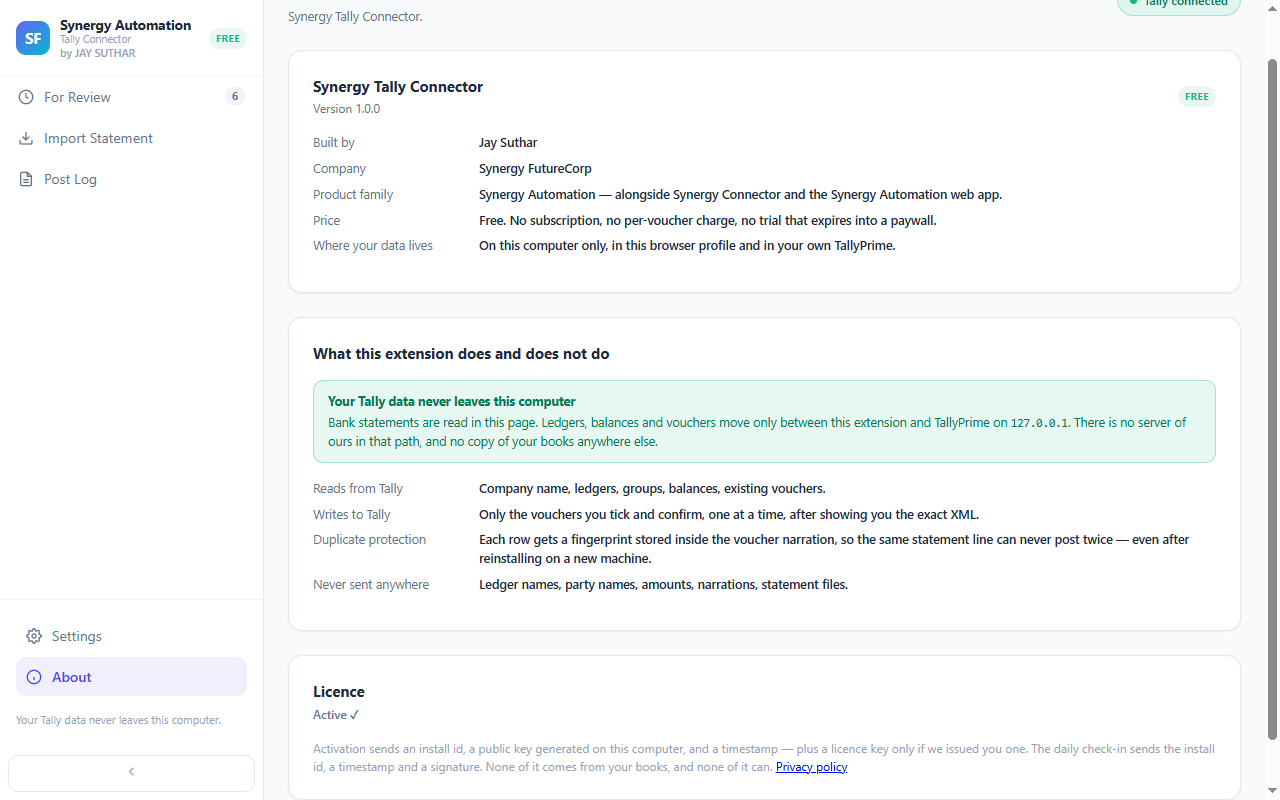
It means your accounting data. Your Excel file, the narrations, the party names, the amounts, your chart of accounts and every entry you post — all of it stays on your computer, between you and your Tally. None of it reaches us.
We won’t pretend the extension never touches the internet, though. It sets itself up once so that we can support your copy, and checks in at most once a day while you’re online. That check-in carries nothing from your books — no statement, no ledger, no amount. If you’re offline, it simply waits, and everything keeps working for you.
The full privacy policy for the extension spells out exactly what that check-in contains, if you’d like every detail.
You do not have to take our word for it
Before you install anything, Chrome shows you what it can reach. Look at that for this extension and you’ll see it can reach the Tally on your own computer — and nothing else. It can’t see the websites you visit, and it never sends your statement anywhere.
Why this is unusual
Until now, getting your statement into Tally meant sending it somewhere — to a website, or into a platform that holds your books alongside everyone else's. Both work. Both mean your client’s statement leaves your office.
The only other choice was typing it in yourself, line by line. Now you have a third: the typing is done for you, and the statement never goes anywhere.
Try it on a statement you would not want to upload
Free, no sign-up, and the file never leaves the machine you open it on.
Add to Chrome — FreeTakes about a minute to installWhat you give up
Being on your computer is also the limitation, and it is worth knowing before you install. The extension posts into the Tally on the machine it is installed on, so it will not work from a different computer, and it is not the right choice if you need to work on the same books from several places. That is what the cloud app is for — it runs from any machine, with an account, and your data is stored securely in our system. Both are free. They are for different situations.
Questions
Does my bank statement get uploaded anywhere?
No. The file is read on your own computer and the entries go to the TallyPrime running on that same computer. Your statement, your ledgers, your party names and your amounts are never sent to us and never sent to anyone else.
So the extension sends nothing at all?
It sends one thing, and it is worth being precise about. Each installation activates once so it can be supported, and checks in at most once a day. That request carries a random identifier generated on your computer, a public key for the installation and a timestamp. It carries nothing from your books and cannot be made to. If your computer is offline the check-in simply does not happen and the extension keeps working.
Is that identifier a device fingerprint?
No. It comes from a key generated at random on your computer — not from your hardware, your browser, your IP address, your Tally company or anything about you. It cannot be linked back to you or to your accounting data.
How can I check any of this for myself?
Chrome tells you what an extension is allowed to reach before you install it. Look at that list for this one: it can reach the Tally on your own computer, and nothing else. It cannot open a website and it cannot see anything you browse.
Where does my data actually live?
In the extension’s own storage on that computer, in a folder on your disk if you choose one, and in your TallyPrime company once you post. You can export or erase all of it from Settings. Removing the extension destroys the local copy, and we hold no copy to delete because we never received one.
Do I need an account?
No. There is no sign-up, no email address and no password. Install it and use it.
Nothing to upload. Nothing to sign up for.
Free, and it works with the TallyPrime already on your computer.
Add to Chrome — FreeMore on the extension: how it works, screen by screen · the Tally import errors it avoids
Not affiliated with, endorsed by, or sponsored by Tally Solutions Pvt Ltd. “Tally” and “TallyPrime” are trademarks of Tally Solutions Pvt Ltd, used only to indicate compatibility.